The Short Answer
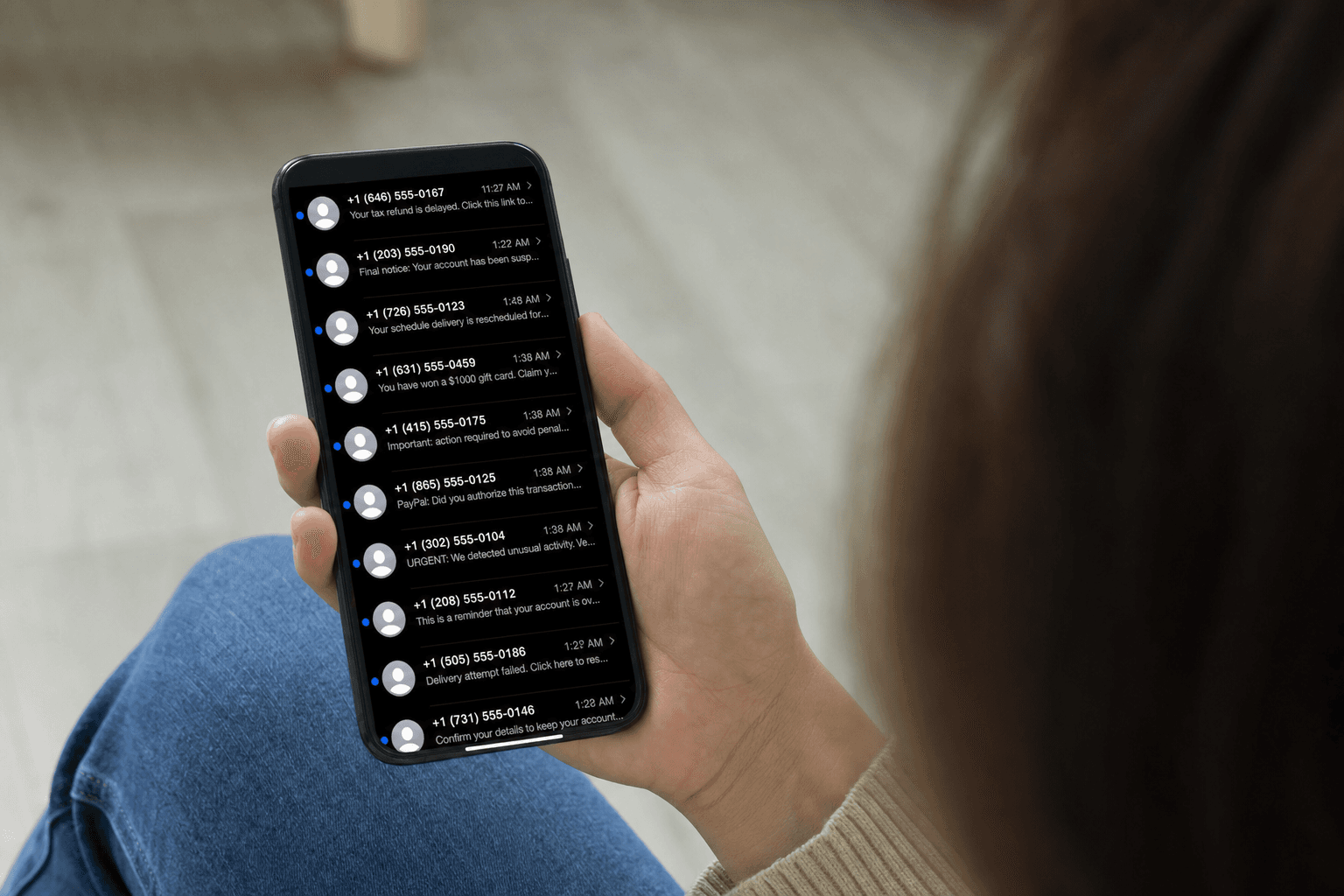
To check if a text message is a scam, never tap the link first. Look at who sent it, what it is asking, and whether you were expecting it. Scam texts (called smishing) almost always come from an unknown number or email address, push you to act fast, and contain a link to a fake login or payment page. If you are not sure, copy the link without opening it and paste it into the ScamVerify™ text checker, or paste the whole message in for a verdict. Text is now the number one way scammers reach people, so this check matters more than ever.
What You'll Learn
- The fast checks that expose a scam text in seconds
- Why you should never tap the link to "see what it is"
- How to verify a suspicious text with the ScamVerify text checker
- How to report scam texts and cut down future ones
1. Look at Who Sent It
Real businesses text you from a short code (a 5 or 6 digit number) or a consistent verified number. Scam texts usually come from:
- A regular 10 digit mobile number you do not recognize
- An email address instead of a phone number
- A number that does not match the company it claims to be
A "package delivery" or "your bank" text from a random personal number is a strong scam signal on its own.
2. Judge the Ask, Not the Wording
Smishing follows a small set of scripts. If a text matches one of these, treat it as a scam until proven otherwise:
| Scam text type | What it claims | What it wants |
|---|---|---|
| Unpaid toll | "You owe a toll, pay to avoid a late fee" | Card details on a fake toll site |
| Package delivery | "We could not deliver your package" | Login or a small "redelivery fee" |
| Bank alert | "Suspicious activity, verify now" | Your banking login or a one-time code |
| Job offer | "We saw your resume, easy work from home" | Money to "start" or your bank details |
| Wrong number | "Hi, is this Sarah?" then friendly chat | Trust, leading to an investment scam |
The text may be perfectly written. AI has removed the spelling mistakes that used to give scams away, so judge what it is asking you to do, not how it reads.
3. Never Tap the Link to "See What It Is"
This is the most important rule. The link is the entire point of the message. Tapping it can take you to a convincing fake login page, start a malware download, or simply confirm to the scammer that your number is live and worth targeting again. If you want to know where a link goes without the risk, press and hold it to preview the URL, or copy it and check it safely.
4. Check the Text with the ScamVerify Text Checker
When a message looks almost legitimate, you do not have to guess. Paste the text, or the link from it, into the ScamVerify text checker. It reads the sender, inspects the link against more than 180,000 known malicious domains, and analyzes the language for smishing patterns, then tells you in plain English whether it is safe. This is the safe way to "open" a suspicious link, because the checker visits it, not you.
Why This Matters More in 2026
Text has overtaken both phone calls and email as the number one way scammers contact people, according to FTC reporting. The reasons are simple: texts get opened almost every time, they feel personal, and a single link does all the work. Toll-message scams alone helped push government-impersonation reports up sharply this year. The volume is not slowing down, which is why a five second check before you tap is one of the highest-value habits you can build.
How to Report a Scam Text
- Forward the text to 7726 (which spells SPAM). This sends it to your carrier's spam-reporting system at no charge and helps them block the sender.
- Use your phone's built-in "Report Junk" option. On iPhone and Android, a report-and-delete link appears under messages from unknown senders.
- Report it to the FTC at ReportFraud.ftc.gov.
- Delete it, and do not reply, not even "STOP." Replying confirms your number is active.
What to Do If You Already Tapped the Link
- If you entered a password or login, change it immediately on the real site and turn on two-factor authentication.
- If you entered card details, call your bank or card issuer to freeze the card and dispute any charges.
- If you downloaded anything, delete it and run a security scan on your phone.
- Watch your accounts closely for the next few weeks and report any unauthorized activity.
The Bottom Line
A scam text wins the moment you tap the link, so the whole game is to check before you tap. Look at the sender, judge what the message is asking, and when it looks even slightly off, run it through the ScamVerify text checker instead of opening the link yourself. Then forward it to 7726 so your carrier can block the next one.
FAQ
How do I know if a text message is a scam?
Look at three things before tapping anything: the sender (scam texts usually come from unknown numbers or email addresses), the request (urgent demands to pay, log in, or confirm a code), and whether you were expecting it. If a text pushes you to act fast through a link, treat it as a scam. To be sure, paste the message or its link into the ScamVerify text checker for a verdict.
Is it safe to click a link in a text to see if it is real?
No. The link is the dangerous part of a scam text. Tapping it can lead to a fake login page, trigger a malware download, or confirm to the scammer that your number is active. If you need to know where a link goes, preview it by pressing and holding, or paste it into the ScamVerify text checker, which inspects the link safely so you do not have to open it.
What does forwarding a text to 7726 do?
Forwarding a scam text to 7726 (which spells SPAM) sends it to your mobile carrier's spam-reporting service for free. Carriers use these reports to identify and block scam-sending numbers across their network. After forwarding, delete the message and do not reply to the original sender.
Should I reply STOP to a scam text?
No. Replying anything, including STOP, confirms to the scammer that your number is real and monitored, which can lead to more scam texts. The STOP keyword only works with legitimate marketing senders. For a scam text, do not reply. Forward it to 7726, report it, and delete it.